Rabu, 23 Januari 2013

Windows 8 All in One x86/x64

 Windows 8 Pro دانلود نسخه نهایی ویندوز هشت Windows 8 All In One x86/x64


Windows 8 All In One. Pasti semua sudah pada tahu tentang OS dan Windows 8. "Windows 8 adalah nama kode untuk versi mendatang dari Microsoft Windows, serangkaian sistem operasi yang diproduksi oleh Microsoft untuk digunakan pada komputer pribadi, termasuk komputer rumah dan bisnis, laptop, netbook, tablet PC, server, dan PC pusat media". Kata Wikipedia.
Oke langsung saja berikut adalah beberapa Review tentang Windows 8:

Windows 8 Description-
The next generation of Windows, a re-imagining of the operating system from the chip to the experience
This is a detailed preview of the next major release of Windows, code-named "Windows 8". From the chipset to the user experience, Windows 8 brings a new range of capabilities without compromise.
Windows 8 is designed to be the first Windows client to support systems on a chip (SoC) architectures, including ARM, and since it will be pre-installed on a range of next generation devices, it will also feature Metro, a NUI + GUI interface on the surface combined with a new application platform under-the-hood designed to enable the creation of immersive experiences.
The latest iteration of Microsoft's operating system brings an innovative new platform and tools to developers. Windows 8 apps can use a broad set of new libraries and controls, designed for fluid interaction and seamless connectivity. Apps can add new capabilities to Windows and to other apps, connecting with one another through the new interface.

Touch-First User Interface:
· Metro style - Windows 8 introduces a new Metro style interface built for touch, which shows information important to you, embodies simplicity and gives you control. The Metro style UI is equally at home with a mouse and keyboard as well.
· Touch-first browsing, not just browsing on a touch device - Providing a fast and fluid touch-browsing experience, Internet Explorer 10 puts sites at the center on new Windows 8 devices.

More Ways to Engage With Powerful, Connected Apps:
· Powered by apps - Metro style apps built for Windows 8 are the focal point of your experience, filling your entire screen so there are no distractions.
· Apps can work together - Apps communicate with each other in Windows 8. For example, you can easily select and email photos from different places, such as Facebook, Flickr or on your hard drive.
· Your experience syncs across your devices - Live roams all the content from the cloud services you use most — photos, email, calendar and contacts — keeping them up-to-date on your devices. With SkyDrive, you can access your files, photos and documents from virtually anywhere with any browser or with Metro style apps in Windows 8.

Enhanced Fundamentals:
· The best of Windows 7, only better - Windows 8 is built on the rock-solid foundation of Windows 7, delivering improvements in performance, security, privacy and system reliability. Windows 8 reduces the memory footprint needed - even on the lowest-end hardware - leaving more room for your apps.
· Preserving power-user favorites and making them better - For those who push the limits of their PC, Windows 8 features an enhanced Task Manager and Windows Explorer and new, flexible options for multimonitor setups.

New Developer Opportunities:
· Windows Store - The Windows Store will allow developers to sell their apps anywhere Windows is sold worldwide, whether they’re creating new games or familiar productivity tools.
· Build using more languages - Windows 8 lets you leverage your existing skills and code assets to create great experiences using the programming language you prefer.
· Rich hardware integration leads to richer experiences, particularly for games - DirectX 11 gaming power underlies Windows 8, allowing the easy creation of full-screen games with smooth, flicker-free action.

New Generation of Hardware:
· One Windows - many shapes and sizes - Support for ARM-based chipsets, x86 (as well as x32 and x64) devices, touch and sensors means Windows 8 works beautifully across a spectrum of devices, from 10-inch tablets and laptops to all-in-ones with 27-inch high-definition screens.
· Always connected - With Windows 8, new ultrathin PCs and tablets turn on instantly, run all day on a single charge and stay connected to the Internet so your PC is ready when you are. Next-generation system on a chip (SoC) support will also enable greatly extended standby and low-power states.
· Tap the full power of your PC - Windows 8 runs on PCs and is compatible with the devices and programs you use today on Windows 7, without compromise, to deliver the performance you expect of a PC.

Requirements:
· 1 gigahertz (GHz) or faster 32-bit (x86) or 64-bit (x64) processor;
· 1 gigabyte (GB) RAM (32-bit) or 2 GB RAM (64-bit);
· 16 GB available hard disk space (32-bit) or 20 GB (64-bit);
· DirectX 9 graphics device with WDDM 1.0 or higher driver.
· Taking advantage of touch input requires a screen that supports multi-touch


x86 (32-bit)s
Windows 8 x86
Windows 8 N x86
Windows 8 Pro x86
Windows 8 Pro VL x86
Windows 8 Pro N x86
Windows 8 Pro with Media Center x86
Windows 8 Enterprise x86
Windows 8 Enterprise N x86

x64 (64-bit)s
Windows 8 x64
Windows 8 N x64
Windows 8 Pro x64
Windows 8 Pro VL x64
Windows 8 Pro N x64
Windows 8 Pro with Media Center x64
Windows 8 Enterprise x64
Windows 8 Enterprise N x64


Download Windows 8 All in One x86/x64 :


Original Untouched MSDN

32bit :
CRC32: 049795D9
MD5: 4252407333706DF89A0C654924DD3F06
SHA-1: 22D680EC53336BEE8A5B276A972CEBA104787F62

64bit : 
CRC32: A5889F86
MD5: 0E8F2199FAE18FE510C23426E68F675A
SHA-1: 1CE53AD5F60419CF04A715CF3233F247E48BEEC4


Terimakasih
Selamat Menikmati

Kamis, 09 Juni 2011

Crack Idm 6.05 dan Setingan Agar lebih Cepat

IDM sebagai software Download Manager menjadi pilihan banyak orang karena filenya yang terbilang kecil dan tidak membutuhkan resource memory yang besar sehingga tidak memberatkan kinerja PC. Setting IDM secara default telah memberikan performa yang baik untuk mendownload file-file di internet, namun ada baiknya anda coba optimalkan lagi settingan tersebut untuk mendapatkan hasil yang lebih cepat dan maksimal.


Berikut ini beberapa tips untuk memaksimalkan kinerja IDM:

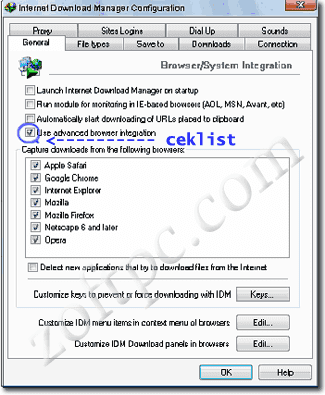
  • Buka IDM Anda, jangan buka yang lain , kemudian klik options, akan muncul gambar seperti dibawah ini, ceklist/centang kotak “use advanced browser integration” ini berguna agar setiap proses download automatis di handle IDM pada setiap browser yang ada di komputer anda.

tips IDM Cara Setting IDM   Optimalkan Kecepatan Internet Download Manager

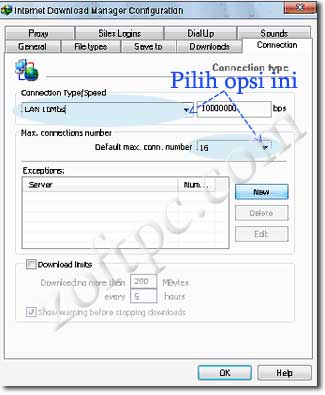
  • Kemudian tekan tab “connection” disana ada dua pilihan yang bisa anda optimalkan, pada opsi connection type/speed plih “LAN 10Mbs“ dan pada opsi Default max. conn number pilih “16” yang berguna untuk memecah file lebih banyak sehingga proses unduhan bisa lebih cepat dan maksimal.

tips optimalkan IDM Cara Setting IDM   Optimalkan Kecepatan Internet Download Manager

  • Pada tab “file types“ anda bisa menambahkan jenis file yang belum ada disana, dalam artian ada beberapa file yang belum terintegrasi sehingga lolos dari cengkraman IDM pada waktu proses downloading icon smile Cara Setting IDM   Optimalkan Kecepatan Internet Download Manager nah disana anda bisa menambahkan jenis file tersebut sehingga untuk kedepannya IDM bisa meng-handle proses unduhan. klik OK untuk menyimpan pengaturan.
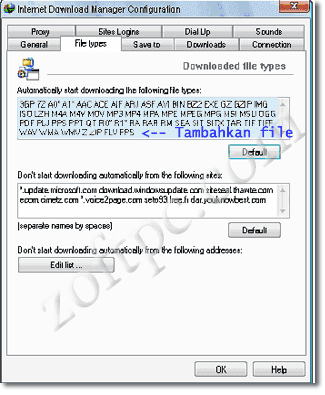
optimalkan IDM Cara Setting IDM   Optimalkan Kecepatan Internet Download Manager


Download Software IDM 6.05
Disini

Download Crack IDM 6.05
Disini


Selamat Mencoba

Kamis, 17 Februari 2011

Cara Mempercepat Mozilla Firefox


Cara Mempercepat Mozilla Firefox saat Browsing

1. Bukalah firefox anda

2. Pada address bar ketik about:config

3. Pada kolom filter tuliskan network.http

4. Untuk merubah beberapa setingan, klik ganda.

5. Ubah network.http.pipelining menjadi true.

6. Ubah network.http.proxy.pipelining menjadi true.

7. Beri nilai network.http.pipelining.maxrequests misal 64.

8. Klik kanan pada sembarang tempat, pilih New, Integer. Beri nama nglayout.initialpaint.delay dan isi nilainya 0.

Restart Firefox anda!


Selamat Berbrowsing

Cara Mengatasi 'Generic Host Process for Win32 Services'


Ketika sedang enak-enaknya surfing di internet, Anda lihat icon Internet tetap terkoneksi di system tray tapi Anda tidak bisa surf, browse atau melakukan apapun. Anda mendapatkan suatu pesan error seperti “Generic Host Process for Win32 Services has encountered a problem and needs to close. We are sorry for the inconvenience.” Pesan error report tentang kegagalan netapi32.dll dan svchost.exe. Anda mencoba untuk diskonek internet Anda karena tidak aktivitas internet tetapi icon Internet tidak tampak. Anda menerima sebuah pesan error seperti “Your PC has recovered from a serious problem”, dsb.

Lalu bagaimana mengatasi masalah tersebut?

Sebetulnya kalau kotak dialog tersebut dibiarkan tidak ditutup atau ditekan OK, biasanya koneksi kita akan terus berjalan. Jadi jangan kesusu menekan tombol OK di kotak dialog tersebut, tapi sembunyikan saja di tempat yang tidak kelihatan atau tidak menutupi layar, dan koneksipun akan tetap berlanjut. Namun itu biasanya hanya berlangsung beberapa saat saja, dan selang beberapa lama kemudian, layar akan 'blink' putih, dan tetap berjalan, tapi koneksi tidak tersambung.

Cara kedua sebetulnya sangat mudah sekali mendapatkan solusinya, yaitu dengan
mencarinya di mbah Google dengan mengetikkan kata kunci “Fix Generic Host”, dan Anda akan menemukan banyak sekali blog yang menulis tentang masalah ini. Diantaranya adalah seperti yang akan diurai berikut ini.


Menutup Port 445:

1. Start Registry Editor (Regedit.exe) dengan meng-klik Start menu, kemudian klik Run.

2. Pada kotak kecil yang terbuka, ketik: regedit kemudian klik OK. Registry Editor sekarang terbuka.

3. Carilah registry berikut:
HKEY_LOCAL_MACHINE\System\CurrentControlSet\Services\NetBT\Parameters
Di bagian kanan window carilah opsi yg bernama TransportBindName.
Dobel klik angka tersebut, kemudian delete default value, sehingga menjadi kosong (blank value).


Menutup Port 135:

1. Kemudian Anda harus mencari kunci berikut:
HKEY_LOCAL_MACHINE\Software\Microsoft\OLE

2. Anda akan melihat sebuah String Value yang bernama: EnableDCOM
Set-lah value ke: N (biasanya tertulis Y)

3. Tutuplah Registry Editor. Restart-lah komputer Anda.


Perhatian: Sebelum melakukan perubahan pada registry tersebut, sebaiknya dibackup terlebih dahulu, karena ada dampak dari perubahan registry tersebut, seperti koneksi LAN tidak tersambung, dsb.

PTC Yang Membayar


Anda ingin mempunyai penghasilan dari internet dengan mudah?
Bergabunglah disini..
Anda akan dibayar hanya dengan mengeklik saja..
Ikuti langkah-langkah berikut:

1. Anda harus mempunyai Akun Paypal/AlertPay/Libertyreserve
Jika belum punya, klik di bawah ini untuk mendaftar
Sign up for PayPal and start accepting credit card payments instantly.


- Klik Sign Up
- Isi data-data Anda
- Jika sudah, kemudian Login

2. Anda harus mendaftar di situs PTC yang ada di bawah.
- Caranya klik baner dibawah.
- Kemudian klik Register.
- Isi data-data Anda, secondary password dikosongi tidak apa-apa.
- Klik Register
- Anda langsung bisa Login, jika tidak bisa Anda harus melakukan verifikasi akun di email Anda.
- Setelah login, klik View Advertisements/Ads..
- Klik Link iklan tersebut.
- Tunggu sampai ada tanda centang pada halaman atas dan ada tulisan $0.01 (untuk PTC no 1 - 20), untuk PTC no 31 - 40 isi angka disebelah kanan angka tersebut kemudian klik tombol disebelah kanannya.
- Setiap hari Anda akan mendapat link iklan..
- Setelah iklan diklik semua, lihat Akun anda..
- Saldo Anda akan bertambah.
- Saldo Anda bisa direquest jika sudah terkumpul $2.
- Semakin anda banyak mendaftar situs PTC, semakin banyak uang yang anda dapatkan..

3. Selamat mencoba, semoga berhasil..


Daftar PTC:

1. Onbux


2. Vcbux

vcBux


3. NRbux

NRBUX


4. Amenbux

AmenBux


5. Oebux

oeBux


6. Lnbux

LNBUX Kapella


7. Bananabux

BananaBux


8. Coldbux


9. Metalbux

MetalBux


10. Ebux

eBux


11. Holybux

HOLYBUX


12. Jjbux

jjBux


13. Peakbux

PeakBux


14. Tbmbux

tbmbux


15. Homebux

HomeBux


16. Arnbux

ArnBux


17. Abandbux

AbandBux


18. Starbux

Starbux


19. Bravobux

BravoBux


20. Gdbux

GDBUX


21. Azbux

azbux.net


22. Qpbux

qpbux


23. Buxbindass

buxbindass


24. Neobux


25. Ltdbux

LtdBux


26. Uniqbux

UniqBux


31. Ranbux


32. Infinitybux


PTC Lokal:

1. IDR-Clickit


2. Sentraclix

SentraClix


3. Dbclix

DbClix


4. Ayoburuanklik


Kamis, 13 Januari 2011

Kendali Motor Steper dengan Atmega16


With this project you can control a unipolar stepper motor. You can control both the speed and the direction of the motor.

The speed and direction and can changed with help of the keypad. The data's are displayed over the LCD display.

A 4x4 keypad is used for entering the speed and selecting the direction.

Load the hex file into the chip, dont forget to select the internal oscillator at 10Mhz.

Then switch on the circuit and select the direction by pressing the corresponding key (Left or Right). Then enter the speed through the numeric keys and press the Enter key to start the operation. To switch off the motor press the separate switch which is connected to the port A.0

Proteus simulation file is also added with the download file, so that you can run the program on your desktop.


Download skematik dan program:


http://avrprojects.info/files/files/Stepper-motor-with-atmega16.zip


Menggabungkan (Join) Beberapa File Berformat Avi Tanpa Software


Untuk menggabungkan, bisa menggunakan perintah COPY dari Command Line Prompt.

Masuk ke command line (Klik 'start' > 'run' > ketik: 'cmd').

Setelah muncul prompt nya, masuk ke folder tempat file-file tersebet (misalnya, folder anda di drive D, ketik: D:)

Lalu ketik:

COPY /V /B File.001 + File.002 + File.003 File.AVI

Setelah itu tekan 'Enter'


/V ini untuk verifikasi bahwa file tertulis dengan benar

/B ini untuk memaksa penulisan file dalam bentuk Binary

FILE.001 + FILE.002 + FILE.003 ini kumpulan file-file nya

FILE.AVI ini hasil akhirnya


Kalau di dalam nama file nya ada spasinya, gunakan tanda kutip ganda untuk menamakan file nya.

Contoh:

copy /v /b "File Satu.001" + "File Dua.002" "File Akhir.avi"


"Selamat Mencoba "

Kamis, 02 Desember 2010

OverSize a CD-R using Prassi CD Rep Plus


Perform the following steps to perform an OverSized CD-Copy:
Start Nero
From the action-bar select File and select Preferences.
In the Preferences window, select Expert Features (or Advanced settings for older versions) and select the Enable oversize disc... feature.
Choose a Maximum CD Length and click OK (82:59:59 is the maximum value that can be entered) and be aware of the risks explained in the warning.
From the action-bar select File and select CD Copy.
A window will appear when a CD is copied which is bigger than 74 minutes, click [OK] to start the oversize copy.
The OverSize feature also works fine when creating your own projects.
Keep in mind that it will only work with CD-Writers that support OverSizing.

NOTE:
The last few versions of Nero may cause other burn programs to fail! WinOnCD and Easy CD Creator both don't work anymore after installing Nero.
Download MMC_PXOV.EXE to be able to OverSize CD-R's over 77 minutes using Nero 3.0.7.x in combination with a PlexWriter 4/12 (RX-412) with firmware 1.06 or higher.


index


OverSize a CD-R using CDRWIN
CDRWIN doesn't need any additional parameters to be able to OverSize a CD-R.
Perform the following steps to do an OverSized CD-Copy:

Start CDRWIN
In the CDRWIN - CDROM Recording Tools window click Backup Disc.
in the Backup Disc window click START to begin the CD-Copy operation.
A window will appear with the following message:
Warning: Disc longer than 74 minutes. Do you want to continue?
Click Yes to continue and what for the burn process to finish.

NOTE: Make sure you are using a CD-R which is big enough to hold the original CD!

index


OverSize a CD-R using Prassi CD Rep Plus
Perform the following steps to perform an OverSized CD-Copy:
Start Prassi
From the action-bar select File and select New.
In the New Job Set window, mark Copy Job and click OK.
In the Copy Job window enter a Job Name and click OK.
Select the CD-Reader (in the left window), click the right mouse-button and select Select as Copy job Source (a green arrow will appear next to it).
Select the CD-Writer (in the left window), click the right mouse-button and select Select for Recording (a red arrow will appear next to it).
Preferably mark the Copy the entire source CD... option to first create an image on HD and then writing it (make sure enough HD space is available).
From the action-bar select File and select Record (or Test).
In the Prassi CD Rep Plus - Recording and Timing Panel window, click Options.
In the Options window, goto the Blank Disc part and change the Size of blank media in sectors to the maximum value of 360000 sectors (= 80:00 minutes, 703.1 Mb). The software won't allow you to OverSize a 80 minutes CD-R (yet).
Use the pull-down button next to Test only and select Record (or any other write mode).
When ready Click Go! to start the CD-Copy process.

index


OverSize a CD-R using DiscJuggler
Perform the following steps to perform an OverSized CD-Copy:
Start DiskJuggler (1.05.238 or highter).
From the action-bar choose View and select Options.
In the Options window select the Defaults tab and change the Max image size to 80 min(s) (for v1.05.238) or 85 min(s) (for v1.05.238-TU RADIUM).
When ready click [OK].
From the action-bar choose File and select New.
In the New Task window select CD Player to CD Recorder and click OK.
In the Task 1 - CD Image to CD Recorder window select the following settings (all other settings should be left default):
Source & Destination Tab
Source Select Source CD-Image file
Destination Select Destination CD-Writer (if needed)
Action
Pull-Down menu Select Write
Methode
Slower/Faster Select any speed needed


When ready click Start to start the copy process.


Serial Number Microsoft Office


Microsoft Office 2007

KGFVY-7733B-8WCK9-KTG64-BC7D8 or
BHFYK-9RTKR-RV3J6-X669J-XQ3Q8 or
GKYCK-VGPKM-YYXMY-W89CK-KJ8BJ


Microsoft Office Home & Student 2007

JWR9T-HFR92-74RQ7-3FRMB-CY676 atau
KGFVY-7733B-8WCK9-KTG64-BC7D8 atau
TW6JJ-D28JW-B7KRM-44W66-MGVGY


Microsoft office 2007 Enterprise

BC322-3PV3J-YVJ3Q-VY7M2-GBDQ8 or
CDHDX-4GP8V-D9VMK-D67RY-9MPVW or
FWP7T-XP3Y4-WMH89-PMM96-WR4MJ or
CWXHV-R2HQQ-GGKRJ-MWDCQ-M7QQ8 or
TXY44-W23PY-8VFQD-HYVR6-CCFMJ or
JKJDC-DMBT4-9MJGV-KFMT3-Q9DQM


Microsoft Office 2007 - Office 12 Suite

TT3M8-H3469-V89G6-8FWK7-D3Q9Q


Microsoft Office Professional Plus 2007

GM3C4-HQQJV-4TGMX-3R8CP-G928Q


Microsoft Office Pro 2007

TT3M8-H3469-V89G6-8FWK7-D3Q9Q

Membaca kode warna Resistor

Dibawah ini ada file gambar yang akan memperlihatkan cara membaca nilai resistor dengan melihat warnanya saja. mungkin udah pada kenal yang namanya resistor dan cara ngafalinnya biasanya dibuat sebuah kalimat. misal: habis curi mangga orang n seterusnya yang punya arti habis=hitam, curi=coklat, mangga = merah, dan orang = oranye n seterusnya terserah kamu mau buat kalimatnya bagaimana. tapi kalo mau cepet ingat biasanya dibut jadi kalimat jorok he he he ....cuma saran tp jgn dipakai ya.


Kamis, 18 Maret 2010

Efek Grid pada Foto Tamara Bleszynski


Efek Grid pada Foto Tamara Bleszynski


Kenal Tamara Bleszynski kan ? Saya sekarang pake Foto Tamara Bleszynski sebagai objek … karena saya kira ini bakalan cocok kalo menggunakan efek Grid ini.


Ini sebenernya efek sederhana saja.. tapi hasilnya bisa mengakibatkan foto jadi tambah elegan… menurut saya sih..Cara bikinnya simpel banget dan mudah banget..


Dengan tutorial ini saya harap photoshoper bisa ngerti cara gimana membuat suatu PATTERN. Pattern itu bukan artist.. artis nya tetep tamara Bleszynski.. hehehe.. jadi jangan salah..


Pattern itu suatu objek yang dibuat hanya dengan membuat gambar dasar nya aja dan sifatnya Kontinyu.. fungsinya untuk memFILL dokumen dengan bentuk yang kita inginkan.. hmm…pasti bingung .. untuk lebih jelasnya kita menuju Te..Ka.. Pe…


Buka foto Tamara Bleszynski sebagai objek penderita..( kalo mau download tinggal klik kanan aja > save file As )


tamara bleszynski


Sekarang kita belajar membuat pattern nya.. ( bentuk yang nanti bakal ditempel diatas foto Tamara Bleszynski)


buat dokumen baru ukuran kecil aja 10×10 pixel dengan resolusi 72 pixel / inch.. jangan lupa background nya transparan


pattern1


Zoom sebesar-besarnya.. pokoknya asal keliatan deh..


Buat garis tepi di kiri dan atas dengan menggunakan PENCIL TOOL..warna Hitam


pattern 2


Kalo udah klik Edit > Define Pattern


pattern 3


Tulis nama pattern nya.. saya beri nama default nya aja yaitu pattern 1.


pattern 4


Buka lagi foto Tamara Bleszynski..


Buat layer baru..dengan klik layer > new > layer .. atau klik tombol add new layer seperti yang ada di gambar


tamara bleszynski 1


Klik Edit > Fill .. pilih pattern yang tadi dibuat


tamara bleszynski 2


Hasilnya gini


tamara bleszynski 3


Ganti layer style nya menjadi Overlay


tamara bleszynski 4


Hasil akhirnya :


tamara bleszynski 5


keren kan ??


Sekarang coba ganti bentuk pattern nya..


saya coba pake yang berbentuk gini


tamara bleszynski 6


Hasilnya :


tamara bleszynski 7


Mau pattern yang keliatan 3D ?


gini bentuk pattern dasar nya


tamara bleszynski 8


Hasilnya :


tamara bleszynski 9


untuk yang lainnya silahkan coba-coba sendiri ya..


Selamat mencoba


Artikel Efek Grid pada Foto Tamara Bleszynski ini dipersembahkan oleh Tutorial Photoshop Gratis. Kunjungi Wallpaper, Font, Desktop Theme Gratis Pokoknya Serba Gratis. Baca Juga Cara Membuat Foto manjadi Vektor,